Incoming transactions workflow
Understand how CryptoSwift alerts you about incoming transactions and what to do when details are missing.
An incoming transaction can originate from a Travel Rule message received from another VASP or integration, or from automatic detection of an inbound blockchain transfer. In both cases, CryptoSwift creates an INCOMING record that enters your incoming compliance workflow. This page explains how notifications arrive, how Personally Identifiable Information (PII) becomes visible, and which operational steps keep investigations on track when information is incomplete.
Before live incoming operations begin, register and confirm your VASP's real custodial wallet inventory in Production. Use a few test wallets in the Sandbox. Wallet matching and confirmation affect message routing, PII visibility, and optional automatic incoming detection.
For wallet monitoring setup, supported networks, and Sandbox limitations, see Automatically detected incoming transactions.
How notifications arrive
- Incoming record created - CryptoSwift creates an
INCOMINGtransaction when an originator VASP or integration sends a matching Travel Rule message. If automatic detection is active, CryptoSwift can also create the record after detecting an inbound transfer to an eligible confirmed custodial wallet, even if no Travel Rule message has arrived. - Delivery channel - You can consume updates through the CryptoSwift Client Dashboard, via webhooks, or by polling the Transactions API. Use webhook signatures to verify authenticity.
- PII visibility - Sensitive fields unlock only after the destination wallet is confirmed in your "My Wallets" list (your custodial wallets used for deposits). This can be done with a single "Confirm" button click in our Client Dashboard or automated via the API. Review the disclosure logic in PII data handling to align with your privacy policies.
Incoming payments and Travel Rule messages
The sequence below illustrates the actions around inbound Travel Rule messages for CryptoSwift clients acting as the beneficiary VASP.
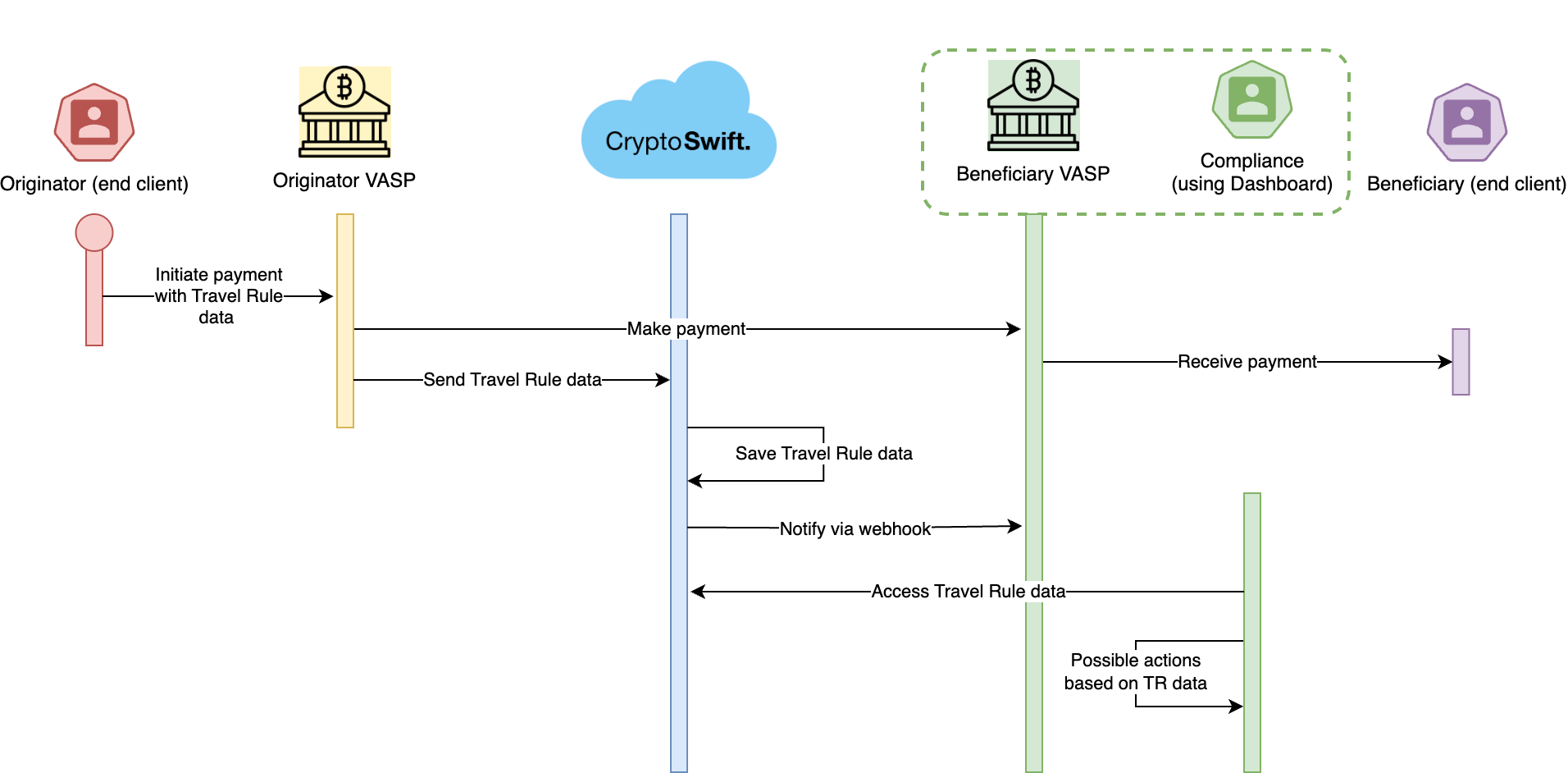
This diagram represents a scenario where the originator VASP uses the post-transaction flow, meaning you as the beneficiary VASP may receive the on-chain transaction before receiving the Travel Rule data. The originator might instead implement a pre-transaction flow where they send the Travel Rule message before the on-chain transfer and use your response together with risk score, amount thresholds, or Rule Engine policies to decide what happens next. This is why it is important to respond to incoming Travel Rule messages.
Initially, you might have many incoming transactions without any Travel Rule data, even after the transaction arrives. Even so, it is important that each VASP using CryptoSwift sets up their systems to respond to messages. Only this way can the ecosystem move toward richer pre-transaction decisioning, step by step.
Operational steps to cover
1. Maintain your custodial wallet inventory
Keep your CryptoSwift wallet list aligned with the addresses you operate. Confirm ownership whenever a new custodial wallet appears so inbound Travel Rule messages map cleanly to your customer accounts and expose PII without delays. Follow the wallet inventory setup and maintenance guide.
2. Capture and route incoming notifications
Configure a central webhook endpoint (or monitoring queue) that forwards incoming transaction updates to the teams responsible for transaction monitoring. Make sure payloads reach both compliance analysts and any downstream case-management systems.
3. Decide when to release funds or escalate
Define risk-based criteria (amount thresholds, risk scores, customer tiering) that determine whether funds move immediately after blockchain settlement or remain on hold pending additional checks. Where appropriate, automate these outcomes with the Rule Engine. Document the playbook so analysts know when to pause payouts, request more data, or escalate to manual review.
4. Handle missing or incomplete data
If automatic incoming detection is active for a confirmed custodial wallet, CryptoSwift creates an incoming record when it detects the on-chain deposit, even if no Travel Rule message has arrived. This gives your team a transaction to review and enrich, but it does not by itself supply the missing originator information.
When the originator VASP has not provided Travel Rule data, use one or both of these paths, whether the incoming record was automatically detected or not:
- Backfill internally - Collect details from your customer or external sources. Add them to an automatically detected record, or create an incoming record if one does not exist, so your audit trail stays complete.
- Submit a claim - Ask CryptoSwift to seek the missing data. We search for existing information, contact the originator VASP when necessary, and forward any recovered Travel Rule details back to you.
Read more about the technical integration for backfill and claims.
5. Monitor outcomes and close the loop
Track whether analysts confirm, decline, or keep transactions pending. Update statuses in CryptoSwift so your own ledgers stay reconciled. When the incoming record is linked to a counterparty Travel Rule message, the counterparty can also receive the applicable status response.
Best practices
- Reconcile blockchain transactions against Travel Rule payloads regularly to detect any missing messages.
- Share this workflow with AML and customer-support teams so everyone understands what happens when additional information is requested from customers.
Next steps
- Automatically detected incoming transactions
- PII data handling
- Improving data quality
- Rule Engine
- Webhooks
See also
- End-to-end Travel Rule lifecycle
- Missing or incomplete Travel Rule data
- CryptoSwift Compliance Documentation